Free for guests · 14-day host trial

Bachelorette money, sorted.

Plan the events, split every cost fairly, scan receipts, and settle up — so the group chat stays fun.

Free for guests. Hosts get a 14-day free trial. See pricing

How it works

One party, two jobs.

The host builds the weekend. Everyone else answers a few yes-or-no questions and always knows what it costs them.

If you are hosting

  1. 1Create the partyName it, pick the dates and the currency, and you have a party code. That is the whole setup.
  2. 2Add the events with costsThe house, the dinner, the spa afternoon. Give each one a cost or leave it free, and mark the optional ones optional.
  3. 3Share the codeSend one link. Everyone lands in the same schedule, with the same numbers, instead of six versions in the chat.
  4. 4Close events outAfter the dinner, put in what it actually came to. Shares update, and the balances follow.

If you were invited

  1. 1RSVP to each eventYes, no, or maybe. Your answer is what you are charged for, and a maybe shows what your share becomes if you come.
  2. 2See your share before you commitEvery event shows what it costs you, and what skipping it would save. No guessing, no asking.
  3. 3Log what you spentFronted the Ubers? Add it. Your own budget and personal spending stay private to you.
  4. 4Settle up onceAt the end the whole weekend reduces to a short list of who pays whom, in the currency you asked for.

Features

The parts that usually go wrong.

Splitting a weekend is not one big sum. It is a dozen small ones with different guest lists, in a currency that may not be yours.

  • Equal splits, exact pennies

    Every cost divides down to the cent and the leftover pennies go somewhere deliberate, so eight shares of a $100 dinner add back up to $100.

  • Split by percentage, exact amounts, or receipt lines

    Equal is the default. When it is not right — one person had the tasting menu, two shared a room — switch that event to percentages, typed amounts, or line-by-line.

  • Receipt scanning

    Photograph the bill and the line items, tax and tip come back as a list you can assign. Tax and gratuity spread proportionally instead of evenly.

  • Deposits that hold the booking

    Mark an event deposit required with an amount and how to pay it. Nobody counts as going until she confirms she sent it, so your headcount is real before you book.

  • More than one currency

    USD, CAD, EUR, GBP and MXN. Enter a bill in the currency it was charged in, set the rate once, and read every total in the currency your group thinks in.

  • Co-hosts

    Promote another bridesmaid to co-host and she can add events, set costs and manage the guest list. The party can be handed over entirely, too.

  • Trip details in one place

    The address, the door code, the dress code, what to bring, and the flight everyone keeps asking about — attached to the event instead of buried in the chat.

  • Works for bachelor parties

    And birthdays, ski weekends, and any trip where one person fronts the house. Nothing in the app is gendered; you name the party whatever you like.

Built for the trip

It lives on the phone in your hand.

These are real screens from the demo party — a four-day weekend for eight people, with events, receipts and two currencies already in it.

  • The Bachledger party home on a phone: a left-to-spend total of $23.24 with spent, coming up and maybe amounts, and the next event with Yes, Maybe and No buttons.

    Where the money stands, and what is next.

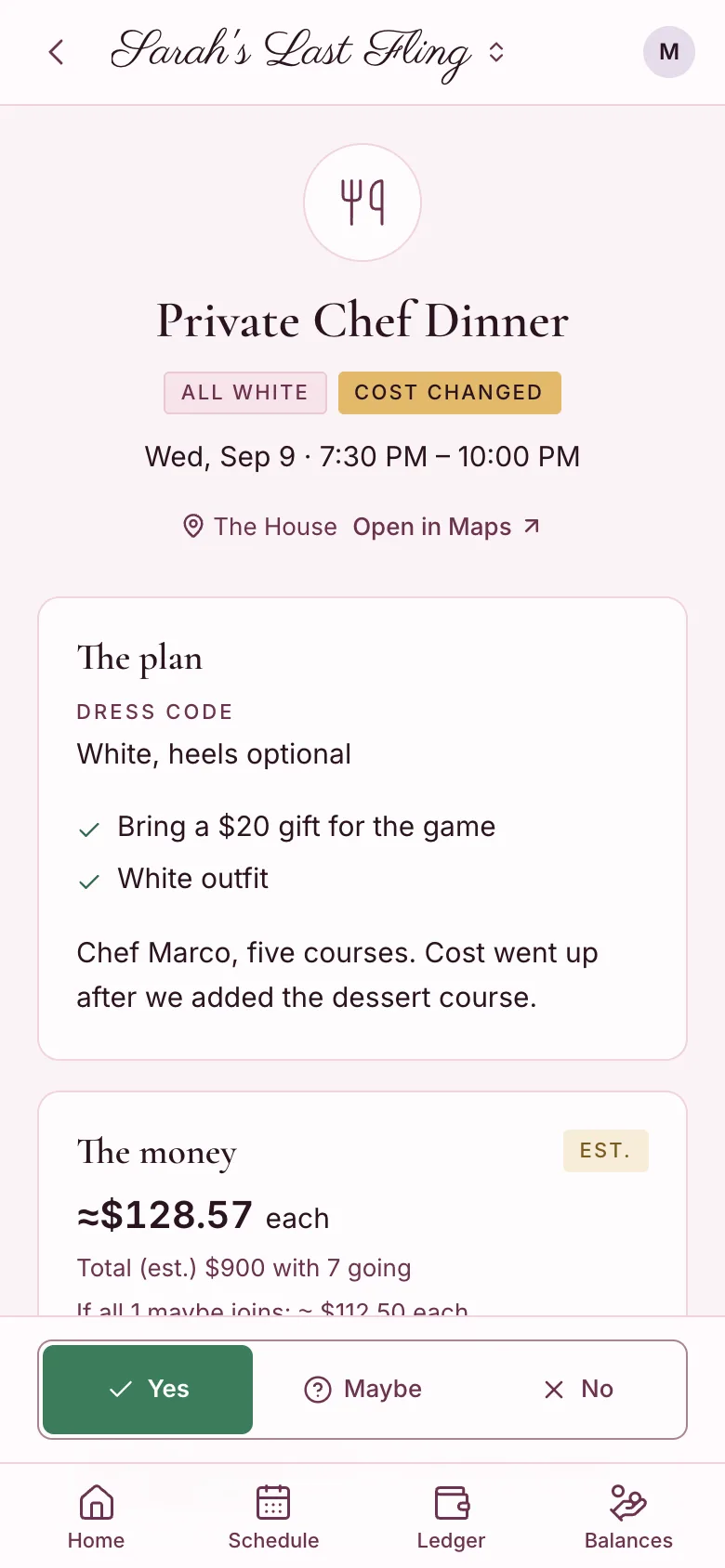
  • An event page for a private chef dinner showing the dress code, the plan, an estimated $128.57 each with seven going, and the RSVP buttons pinned to the bottom.

    Each event carries its own cost and guest list.

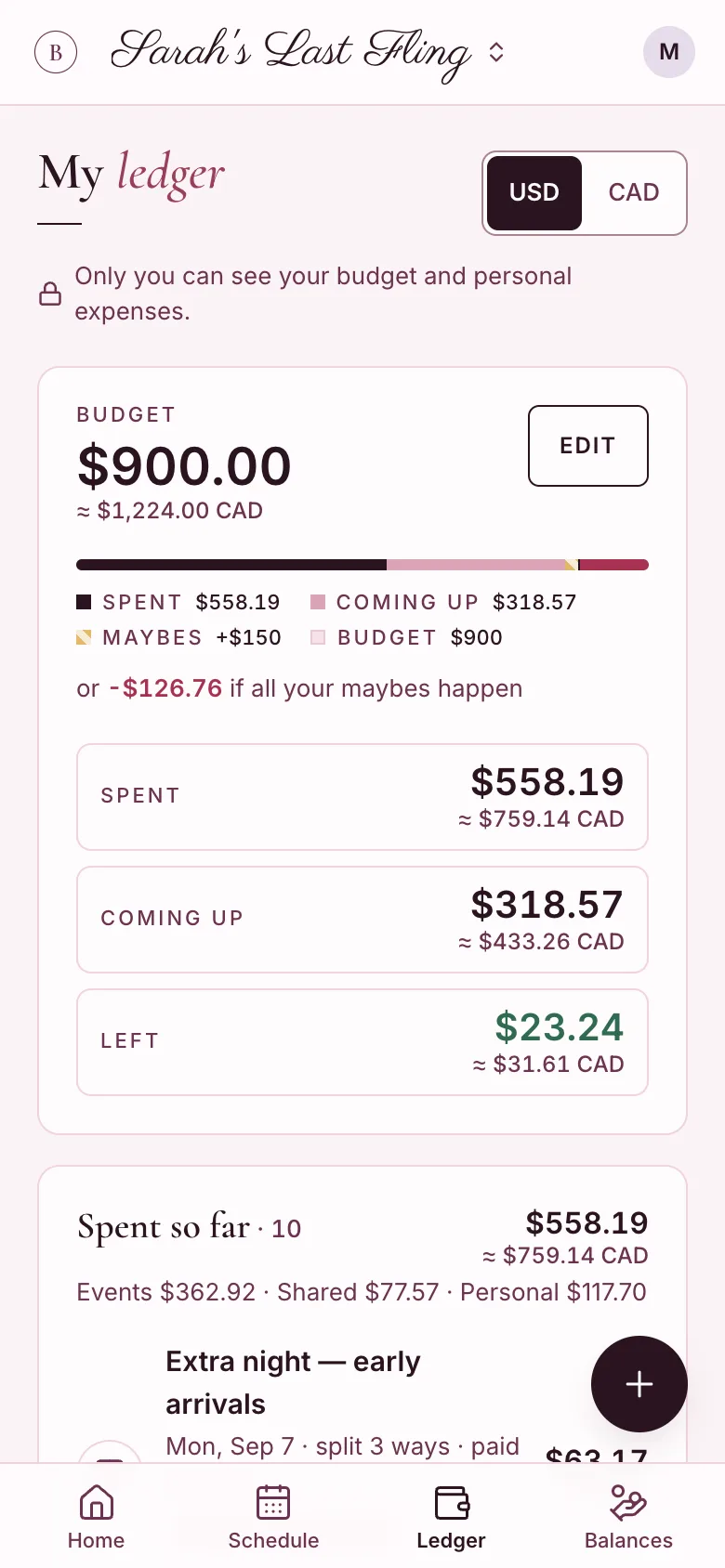
  • A private ledger screen showing a $900 budget, $558.19 spent, $318.57 coming up and $23.24 left, with amounts repeated in Canadian dollars.

    A private budget only you can see.

  • A settle-up screen listing what you owe Jess and Priya and what Chloe owes you, each with a mark paid button.

    The weekend, reduced to a few payments.

Questions

The eight people ask first.

  • What is the best app to split bachelorette party expenses?

    You want one that understands events, not just a running list of receipts, because a bachelorette weekend is really five or six mini-parties with different guest lists. The Bachledger was built for that: each event carries its own cost and its own RSVPs, so the spa afternoon splits between the four girls who went and the house splits between everyone. Balances then reduce the whole weekend to a few payments. It is free for every guest, and the demo needs no account.

    Open the demo party

  • How do you split costs when not everyone goes to every event?

    Split each event between the people who actually attended it, and keep the truly shared costs separate. That is the whole trick, and it is why a single group total feels unfair by Sunday. Ask people to RSVP to each event before you book, so you know the headcount you are dividing by. In The Bachledger the RSVP is the split: a yes puts you in the event cost, a no leaves you out, and a maybe shows what your share becomes if you come.

    How to split the costs fairly

  • How do deposits work for group trips?

    A deposit turns a maybe into a booking. When a house or a boat needs money up front, ask for a portion of each person’s share by a date that sits before your own cancellation deadline, and treat only the people who paid as confirmed. The app supports this directly: mark an event “deposit required” with an amount and a how-to-pay note, and a guest cannot show as going until she confirms she sent it, so your headcount is real.

  • How does receipt scanning work, and is my photo private?

    You photograph the bill, and the app reads the line items, tax, and tip so you can assign them instead of typing them. The photo is stored in the party’s private storage and sent to OpenAI once to be read; it is not used to train models, it is not public, and only members of your party can see it. You can delete the photo at any time and keep the amounts. Full details are on the privacy page.

    Read the privacy page

  • How do you handle a bachelorette party in another currency, like Mexico or Europe?

    Pick one home currency for the whole trip and record foreign spending at the rate you actually got. Cards typically beat airport exchange counters, and taking one larger cash withdrawal beats several small ones. The Bachledger holds USD, CAD, EUR, GBP and MXN: you set the rate once, enter a bill in pesos or euros as it was charged, and every total stays readable in the currency your group thinks in.

    Destination parties: currency, cards, and costs

  • Is The Bachledger free?

    Free for guests, always. Joining a party, RSVPing, seeing your share, scanning receipts, and settling up cost nothing for anyone who was invited, and there are no ads and nothing sold to anyone. The one person who creates the party, the host, subscribes after a 14-day free trial. Only creating a party needs an active plan: a party that already exists keeps working for everyone in it, hosting tools included, even if the subscription ends, so a trip in progress is never interrupted.

    See the pricing page

  • Does everyone need an account?

    Everyone who joins the party does, because each guest sees her own share, her own private budget, and her own balances. Signing up takes a moment with Google or an email address, and there is nothing to install. You can look around first without any of that: the demo is a full party with real numbers you can tap through, and nothing you do in it is saved anywhere.

    Try the demo first

  • Does it work for bachelor parties?

    Yes, and for birthdays, ski weekends, and family reunions that involve one house and eight people. Nothing in the app is gendered: you name the party, add the people, add the events, and split the costs. The reason it suits a bachelor weekend particularly well is that the costs are lumpy and optional in the same way, with one person fronting the house and half the group adding a round of golf.

    Bachelor party expense etiquette

All 21 questions, answered

Go have a lovely weekend.

Set the party up in a few minutes, send one link, and let the numbers keep themselves. Free for guests; the host gets 14 days free and can cancel anytime.